Order Types in Algorithmic Trading: From Limit with Chasing to Virtual Orders
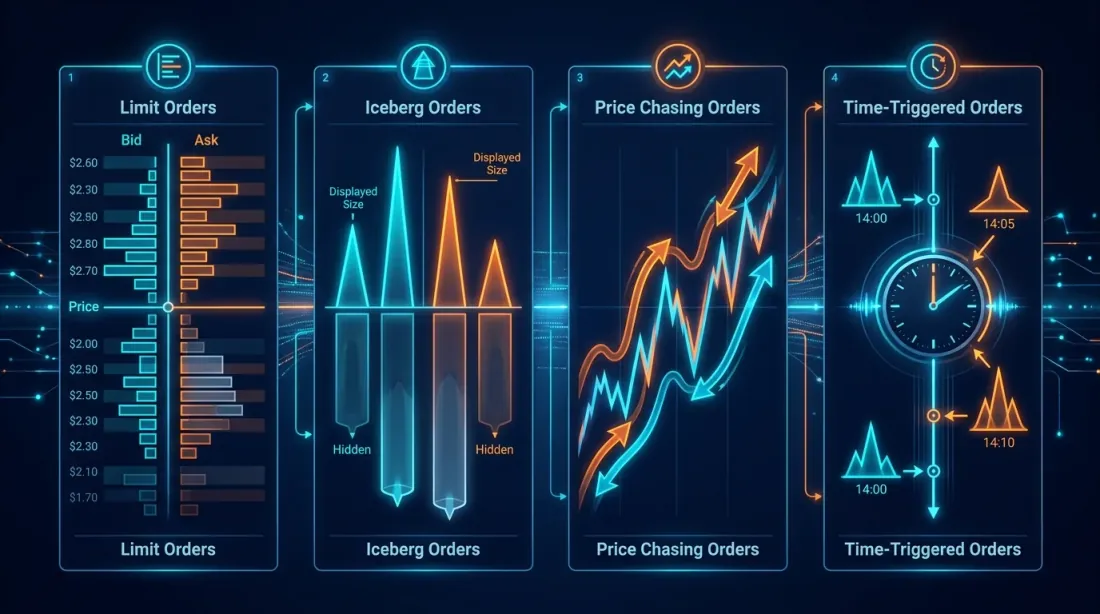
When a beginner opens an exchange terminal, they see two buttons: "Buy" and "Sell." When an algo trader opens their codebase, they see twenty-seven order types, three levels of abstraction, and a pile of edge cases that make them want to close the laptop and go sell cucumbers at the farmers' market. But cucumbers, unfortunately, won't let you run a funding rate arbitrage at 3:59 UTC — so let's dig in.
In this article, we'll walk through the entire journey from basic exchange orders to synthetic virtual constructions that exist only within your system and never appear in the order book. Expect TypeScript, Python, some pain, and a bit of enlightenment.
1. Standard Exchange Orders: The Foundation You Can't Skip
 Classification of standard order types: from market to iceberg
Before building anything complex, we need to make sure we properly understand the basic building blocks. It's surprising how many people confuse stop-limit and stop-market, then wonder why their stop "didn't trigger" (spoiler: it did trigger, but the limit order didn't fill due to slippage).
Market order
The simplest and simultaneously the most dangerous type. You tell the exchange: "Buy/sell right now, at any available price." The exchange takes liquidity from the order book, starting at the best price. If the volume at the best level isn't enough — it slips further.
When to use: emergency position exit, executing a signal where speed matters more than price.
Pitfalls: on a thin market, a market order for 100 BTC can move the price by several percent. Backtests that model market orders without accounting for impact are pure fantasy.
Limit order
You specify an exact price. The order enters the order book and waits until someone agrees to your price. If the price of a limit bid order is above the current market — it fills immediately (like a market order, but with a guaranteed maximum price).
Key point: a limit order does not guarantee execution. The price may reach your level and reverse, leaving you sitting in the queue (more on this in our article about queue position).
Stop-market and Stop-limit
This is where the confusion begins. Both types are "sleeping" orders that activate when the trigger price (stop price) is reached. But:
- Stop-market: upon triggering, converts to a market order. Guarantees execution, but not price.
- Stop-limit: upon triggering, converts to a limit order. Guarantees price (no worse than specified), but not execution.
On the volatile crypto market, a stop-limit can "miss" — the price blew through the stop, the limit order was placed, but the market already flew past. You're left with an unfilled limit order and a growing loss. This is exactly why stop-market is more commonly used for stop-losses.
Trailing stop
A stop that "follows" the price at a set distance. Price goes up — the stop moves up. Price goes down — the stop stays in place. Useful for protecting profits in trend-following strategies.
Exchange support: not all exchanges support native trailing stops. Algo traders often implement them programmatically — this gives more control over parameters (callback rate, activation price, step size).
Iceberg order
An order where only a fraction of the total volume is visible in the order book. You want to buy 1,000 BTC, but you show only 10 in the book. When the first 10 fill — the next 10 appear.
Why: to hide your true intentions from the market. A large order in the book signals to everyone that "someone big wants to buy/sell." In response, HFT algorithms begin front-running, and the price moves away from you.
Caveat: on many crypto exchanges, iceberg orders are either unsupported or easily detected by the pattern of identical volumes. Advanced algorithms randomize the visible portion size.
Time-in-force parameters: GTC, GTD, IOC, FOK
These are not separate order types but time-in-force parameters — how long an order lives:
| Parameter | Full Name | Behavior |
|---|---|---|
| GTC | Good Till Cancelled | Lives until cancelled. The default standard |
| GTD | Good Till Date | Lives until a specified date/time |
| IOC | Immediate or Cancel | Executes immediately (fully or partially), remainder is cancelled |
| FOK | Fill or Kill | Executes only in full and immediately. If impossible — cancelled entirely |
IOC vs FOK: the difference is critical. IOC can fill partially — you wanted to buy 100 BTC, bought 3, the rest was cancelled. FOK is either 100 or nothing.
Post-only (Maker-only)
An order that is guaranteed to enter the order book as a maker and never executes as a taker. If at the time of placement the price would cause immediate execution — the exchange rejects it (or adjusts the price, depending on the exchange).
Why: maker fees are usually lower than taker fees (on Binance — 0.02% vs 0.04% for VIP tiers). For a market maker placing thousands of orders per day, the fee difference is the difference between profit and loss.
2. TWAP and VWAP: How Institutions Hide an Elephant in the Order Book
When a hedge fund wants to buy a $50M position, it doesn't place a single market order. It uses execution algorithms — algorithms that split a large order into many smaller ones and execute them over time, minimizing market impact.
TWAP (Time-Weighted Average Price)
The idea is dead simple: split the total volume into equal parts and execute at equal time intervals.
import asyncio
from datetime import datetime, timedelta

class TWAPExecutor:
    """
    TWAP executor: splits a large order into equal parts
    and executes them at equal time intervals.
    """
    def __init__(self, exchange, symbol: str, side: str,
                 total_qty: float, duration_minutes: int, num_slices: int):
        self.exchange = exchange
        self.symbol = symbol
        self.side = side
        self.total_qty = total_qty
        self.slice_qty = total_qty / num_slices
        self.interval = (duration_minutes * 60) / num_slices
        self.num_slices = num_slices
        self.executed_qty = 0.0
        self.fills: list[dict] = []

    async def execute(self):
        for i in range(self.num_slices):
            remaining = self.total_qty - self.executed_qty
            qty = min(self.slice_qty, remaining)
            if qty <= 0:
                break

            try:
                order = await self.exchange.create_order(
                    symbol=self.symbol,
                    type="market",
                    side=self.side,
                    amount=qty,
                )
                self.executed_qty += float(order["filled"])
                self.fills.append(order)
                print(f"[TWAP] slice {i+1}/{self.num_slices}: "
                      f"filled {order['filled']} @ {order['average']}")
            except Exception as e:
                print(f"[TWAP] slice {i+1} failed: {e}")

            if i < self.num_slices - 1:
                await asyncio.sleep(self.interval)

        avg_price = (
            sum(f["cost"] for f in self.fills) /
            sum(f["filled"] for f in self.fills)
        ) if self.fills else 0
        print(f"[TWAP] done: {self.executed_qty}/{self.total_qty} "
              f"avg price: {avg_price:.2f}")
VWAP (Volume-Weighted Average Price)
VWAP is smarter: it takes into account the typical trading volume profile. If 30% of the daily volume is typically traded between 9:00 and 10:00, VWAP will execute 30% of the order during that window. The goal is to get the average execution price as close as possible to the market VWAP.
class VWAPExecutor:
    """
    VWAP executor: distributes volume proportionally
    to the historical volume profile.
    """
    def __init__(self, exchange, symbol: str, side: str,
                 total_qty: float, volume_profile: list[float]):
        self.exchange = exchange
        self.symbol = symbol
        self.side = side
        self.total_qty = total_qty
        total_weight = sum(volume_profile)
        self.weights = [w / total_weight for w in volume_profile]

    async def execute(self, interval_seconds: float = 60.0):
        executed = 0.0
        for i, weight in enumerate(self.weights):
            qty = self.total_qty * weight
            remaining = self.total_qty - executed
            qty = min(qty, remaining)

            if qty <= 0:
                break

            order = await self.exchange.create_order(
                symbol=self.symbol,
                type="market",
                side=self.side,
                amount=qty,
            )
            executed += float(order["filled"])
            print(f"[VWAP] period {i+1}: weight={weight:.2%}, "
                  f"filled={order['filled']} @ {order['average']}")

            await asyncio.sleep(interval_seconds)
TWAP vs VWAP difference: TWAP is simpler and more predictable. VWAP delivers a better average price but requires a reliable volume profile. On the crypto market, where volumes can be wash-traded, the VWAP profile needs to be built carefully.
3. Limit with Chasing: When Your Order Knows How to Chase the Price
 Chasing limit: the order chases a moving price with configurable aggression
Now things get really interesting. A standard limit order is a passive entity: it sits in the order book and waits. If the price moved — the order remains unfilled. For an algo trader, this is often unacceptable: the entry signal fired, but the position wasn't built because the market moved 0.1%.
Chasing limit order is a programmatic wrapper around a limit order that:
- Places a limit order at the current best price (or with a small offset)
- Monitors the price via WebSocket
- If the price moves away from the order — cancels and replaces it closer to the current price
- Repeats until the order fills or exceeds the allowed deviation
Key Parameters
- chase_interval_ms — how often to check and replace the order. 100ms — aggressive, 1000ms — relaxed.
- max_chase_distance — maximum deviation from the initial price before the order is cancelled. Protection against chasing a runaway market.
- aggression_level — how close to the market price to place the limit order.
0— at the best bid/ask (passive),1— crossing the spread (aggressive, effectively a taker). - chase_on_partial — whether to continue chasing if the order is partially filled.
TypeScript Implementation
interface ChasingOrderParams {
  symbol: string;
  side: "buy" | "sell";
  totalQty: number;
  /** 0 = passive (at best bid/ask), 1 = cross spread */
  aggression: number;
  /** max price deviation from initial price */
  maxChaseDistance: number;
  /** how often to re-evaluate, ms */
  chaseIntervalMs: number;
  /** stop chasing after this many ms */
  timeoutMs: number;
}

class ChasingLimitOrder {
  private currentOrderId: string | null = null;
  private filledQty = 0;
  private initialPrice: number | null = null;
  private startTime = Date.now();

  constructor(
    private exchange: any, // ccxt exchange instance
    private params: ChasingOrderParams
  ) {}

  async execute(): Promise<{ filledQty: number; avgPrice: number }> {
    const fills: Array<{ qty: number; price: number }> = [];

    while (this.filledQty < this.params.totalQty) {
      // Timeout
      if (Date.now() - this.startTime > this.params.timeoutMs) {
        console.log("[CHASE] timeout reached, cancelling");
        await this.cancelCurrent();
        break;
      }

      // Get current order book
      const book = await this.exchange.fetchOrderBook(
        this.params.symbol, 5
      );
      const bestBid = book.bids[0][0];
      const bestAsk = book.asks[0][0];
      const spread = bestAsk - bestBid;

      // Calculate target price
      let targetPrice: number;
      if (this.params.side === "buy") {
        targetPrice = bestBid + spread * this.params.aggression;
      } else {
        targetPrice = bestAsk - spread * this.params.aggression;
      }

      // Remember the initial price
      if (this.initialPrice === null) {
        this.initialPrice = targetPrice;
      }

      // Check max chase distance
      const deviation = Math.abs(targetPrice - this.initialPrice);
      if (deviation > this.params.maxChaseDistance) {
        console.log(
          `[CHASE] max deviation exceeded: ${deviation.toFixed(4)} > ` +
          `${this.params.maxChaseDistance}`
        );
        await this.cancelCurrent();
        break;
      }

      // Check current order
      if (this.currentOrderId) {
        const order = await this.exchange.fetchOrder(
          this.currentOrderId, this.params.symbol
        );

        if (order.status === "closed") {
          fills.push({ qty: order.filled, price: order.average });
          this.filledQty += order.filled;
          this.currentOrderId = null;
          continue;
        }

        // Update filledQty for partial fills
        if (order.filled > 0) {
          const newFilled = order.filled - (
            fills.reduce((s, f) => s + f.qty, 0) - this.filledQty
          );
          // Order is in place — do we need to reprice?
        }

        const currentPrice = parseFloat(order.price);
        const priceDiff = Math.abs(currentPrice - targetPrice);
        const tickSize = spread * 0.1 || 0.01;

        if (priceDiff > tickSize) {
          // Price moved — reprice
          console.log(
            `[CHASE] repricing: ${currentPrice} -> ` +
            `${targetPrice.toFixed(4)}`
          );
          await this.cancelCurrent();
        } else {
          // Order is at the right price — wait
          await this.sleep(this.params.chaseIntervalMs);
          continue;
        }
      }

      // Place new order
      const remainingQty = this.params.totalQty - this.filledQty;
      const order = await this.exchange.createLimitOrder(
        this.params.symbol,
        this.params.side,
        remainingQty,
        targetPrice
      );
      this.currentOrderId = order.id;
      console.log(
        `[CHASE] placed ${this.params.side} ${remainingQty} ` +
        `@ ${targetPrice.toFixed(4)}`
      );

      await this.sleep(this.params.chaseIntervalMs);
    }

    const totalCost = fills.reduce((s, f) => s + f.qty * f.price, 0);
    const avgPrice = this.filledQty > 0 ? totalCost / this.filledQty : 0;
    return { filledQty: this.filledQty, avgPrice };
  }

  private async cancelCurrent(): Promise<void> {
    if (this.currentOrderId) {
      try {
        await this.exchange.cancelOrder(
          this.currentOrderId, this.params.symbol
        );
      } catch { /* order already filled or cancelled */ }
      this.currentOrderId = null;
    }
  }

  private sleep(ms: number): Promise<void> {
    return new Promise((resolve) => setTimeout(resolve, ms));
  }
}
When Chasing Is Harmful
Chasing is a powerful tool, but it's easy to turn into a loss generator:
- Cancel/replace spam. Every cancel and replace is a load on the API. Exchanges rate-limit requests, and aggressive chasing can get your API key banned.
- Adverse selection. If the price is running away from you — the market may know something you don't. Chasing the price in this situation means buying at the top.
- Maker to Taker transition. With high aggression you're effectively paying taker fees, but with a delay (cancel + new order). Sometimes it's simpler to just place a market order.
4. Time-Based Orders: Millisecond Precision
There are situations where you need to execute an order not "at price X" but "at time T." Sounds strange? It's actually an entire class of strategies.
Use cases
Funding rate arbitrage. On perpetual futures, funding is paid every 8 hours (00:00, 08:00, 16:00 UTC on Binance). If the funding rate = +0.1%, you need to be short at the moment of settlement. Strategy: open a short a few seconds before settlement, collect funding, close the position. Timing is critical — a second of delay means missed funding.
Session opens/closes. On traditional markets and some crypto derivatives, there are fixed sessions. The opening auction (NYSE, CME) is the moment when liquidity is at its peak. Placing an order 100ms before the auction is an edge.
News-based execution. Inflation data is released at a scheduled time. The algorithm parses the number from a news feed and places an order within 50ms. Here, time-based execution is combined with event-driven logic.
Implementation
class TimeBasedOrder {
  constructor(
    private exchange: any,
    private symbol: string,
    private side: "buy" | "sell",
    private qty: number,
    private orderType: "market" | "limit",
    private limitPrice?: number
  ) {}

  /**
   * Schedule execution at a precise time.
   * Uses a busy-wait loop for maximum precision.
   */
  async executeAt(targetTime: Date): Promise<any> {
    const targetMs = targetTime.getTime();

    // Phase 1: coarse wait (sleep)
    const coarseWait = targetMs - Date.now() - 500; // wake up 500ms early
    if (coarseWait > 0) {
      console.log(
        `[TIME-ORDER] sleeping for ${(coarseWait / 1000).toFixed(1)}s`
      );
      await new Promise((r) => setTimeout(r, coarseWait));
    }

    // Phase 2: precise wait (busy-wait)
    while (Date.now() < targetMs) {
      // spin — burns CPU, but achieves ~1ms precision
    }

    // Phase 3: execution
    const sendTime = Date.now();
    const order = await this.exchange.createOrder(
      this.symbol,
      this.orderType,
      this.side,
      this.qty,
      this.limitPrice
    );

    console.log(
      `[TIME-ORDER] executed at ${new Date(sendTime).toISOString()}, ` +
      `target was ${targetTime.toISOString()}, ` +
      `delta: ${sendTime - targetMs}ms`
    );

    return order;
  }
}

// Example: place an order exactly at 00:00:00 UTC (funding settlement)
const executor = new TimeBasedOrder(exchange, "BTC/USDT", "sell", 0.1, "market");
const target = new Date("2026-03-24T00:00:00.000Z");
await executor.executeAt(target);
Important caveat: the precision of a time-based order is limited not by your code but by network latency to the exchange. If your ping to the API is 50ms, even a perfect busy-wait will have a 50ms delta. For serious HFT, co-location is used — the server sits physically next to the exchange's matching engine.
5. Virtual/Synthetic Orders: The Invisibles in Your System
 Virtual orders: orders exist only in the bot's memory until the trigger fires
This is perhaps the most underrated tool in the algo trader's arsenal. A virtual order (also known as a synthetic order) is an order that exists only in your system. It is not sent to the exchange until a trigger condition is met (typically — the price reaching a certain level).
How It Works
- Your algorithm decides: "I want to buy BTC at $40,000"
- Instead of sending a limit order to the exchange, it creates a virtual order in memory
- Subscribes to the WebSocket price stream
- When bid/ask reaches $40,000 — sends a real market or limit order to the exchange
Why Virtual Orders Matter
No information leakage. Your order is invisible in the order book. Nobody — not other traders, not HFT algorithms, not even the exchange itself — knows about your intentions until the moment of execution. This fundamentally shifts the balance of power.
Front-running protection. On crypto exchanges, especially less transparent ones, there is reasonable suspicion that information about large limit orders can be used for front-running (there are even studies on this). Virtual orders eliminate this risk.
Grid bots. A classic grid bot places a grid of 50-200 orders at different price levels. If you send them all to the exchange — that's 200 orders in the book that: (a) are visible to everyone, (b) use up the order limit on the exchange (typically 200-300 open orders per account), (c) if the price moves sharply, they all fill and you end up with a massive position. Virtual orders solve all three problems.
Catching falling knives. Strategy: place virtual buy orders at levels -5%, -10%, -15% below the current price. If the market drops — orders trigger gradually. If it doesn't drop — you risk nothing and use no exchange order slots.
TypeScript Implementation
interface VirtualOrder {
  id: string;
  symbol: string;
  side: "buy" | "sell";
  triggerPrice: number;
  qty: number;
  /** Order type sent to the exchange upon triggering */
  executionType: "market" | "limit";
  /** For limit: offset from trigger price */
  limitOffset?: number;
  status: "pending" | "triggered" | "filled" | "failed";
}

class VirtualOrderManager {
  private orders: Map<string, VirtualOrder> = new Map();
  private orderCounter = 0;

  constructor(private exchange: any) {}

  /**
   * Create a virtual order. Nothing is sent to the exchange.
   */
  addOrder(params: Omit<VirtualOrder, "id" | "status">): string {
    const id = `virt_${++this.orderCounter}`;
    this.orders.set(id, { ...params, id, status: "pending" });
    console.log(
      `[VIRTUAL] created ${params.side} ${params.qty} ` +
      `${params.symbol} @ trigger ${params.triggerPrice}`
    );
    return id;
  }

  /**
   * Called on every price tick (from WebSocket).
   */
  async onPriceUpdate(
    symbol: string, bestBid: number, bestAsk: number
  ): Promise<void> {
    for (const [id, order] of this.orders) {
      if (order.symbol !== symbol || order.status !== "pending") continue;

      const triggered =
        (order.side === "buy" && bestAsk <= order.triggerPrice) ||
        (order.side === "sell" && bestBid >= order.triggerPrice);

      if (!triggered) continue;

      order.status = "triggered";
      console.log(
        `[VIRTUAL] ${id} triggered! bid=${bestBid} ask=${bestAsk}`
      );

      try {
        let realOrder: any;

        if (order.executionType === "market") {
          realOrder = await this.exchange.createMarketOrder(
            order.symbol, order.side, order.qty
          );
        } else {
          const limitPrice = order.side === "buy"
            ? order.triggerPrice + (order.limitOffset ?? 0)
            : order.triggerPrice - (order.limitOffset ?? 0);
          realOrder = await this.exchange.createLimitOrder(
            order.symbol, order.side, order.qty, limitPrice
          );
        }

        order.status = "filled";
        console.log(
          `[VIRTUAL] ${id} filled: ${realOrder.filled} ` +
          `@ ${realOrder.average ?? realOrder.price}`
        );
      } catch (err) {
        order.status = "failed";
        console.error(`[VIRTUAL] ${id} execution failed:`, err);
      }
    }
  }

  /**
   * Get all active virtual orders.
   */
  getPendingOrders(): VirtualOrder[] {
    return [...this.orders.values()].filter(
      (o) => o.status === "pending"
    );
  }

  cancelOrder(id: string): boolean {
    const order = this.orders.get(id);
    if (order && order.status === "pending") {
      this.orders.delete(id);
      return true;
    }
    return false;
  }
}

// --- Example: Grid bot with virtual orders ---

async function gridBot(exchange: any) {
  const manager = new VirtualOrderManager(exchange);
  const currentPrice = 42000;
  const gridStep = 200;      // grid step
  const gridLevels = 20;     // levels in each direction
  const qtyPerLevel = 0.01;  // BTC per level

  // Create virtual grid
  for (let i = 1; i <= gridLevels; i++) {
    // Buy orders below current price
    manager.addOrder({
      symbol: "BTC/USDT",
      side: "buy",
      triggerPrice: currentPrice - gridStep * i,
      qty: qtyPerLevel,
      executionType: "limit",
      limitOffset: 1,  // limit price = trigger + 1 USDT
    });

    // Sell orders above current price
    manager.addOrder({
      symbol: "BTC/USDT",
      side: "sell",
      triggerPrice: currentPrice + gridStep * i,
      qty: qtyPerLevel,
      executionType: "limit",
      limitOffset: 1,
    });
  }

  console.log(
    `[GRID] created ${gridLevels * 2} virtual orders, ` +
    `0 on exchange`
  );

  // WebSocket subscription (pseudocode for ccxt.pro)
  while (true) {
    const ticker = await exchange.watchTicker("BTC/USDT");
    await manager.onPriceUpdate(
      "BTC/USDT", ticker.bid, ticker.ask
    );
  }
}
Pitfalls of Virtual Orders
-
Latency gap. Between the moment you see the price and the moment the real order reaches the exchange, time passes. On a volatile market, the price can fly away in those 20-100ms. Solution: send a slightly aggressive limit order (with a buffer).
-
Missed fills. If the price "pierced" your level in a single tick (flash crash) and bounced back — you may not react in time. A regular limit order sitting in the book would have filled; a virtual one — won't.
-
State management. Virtual orders live in memory. If the process crashes — orders are lost. Solution: persistent storage (Redis, SQLite, file) with recovery on restart.
6. Conditional/Smart Orders: Order Combinatorics
When a single order isn't enough, traders combine them into conditional constructions. Some are supported natively on exchanges, others are implemented programmatically.
OCO (One Cancels Other)
Two orders are linked: if one executes — the other is automatically cancelled. Classic example: you're in a long position and want to set both a take-profit and a stop-loss. Whichever triggers first — the other must be cancelled.
class OCOHandler:
    """
    OCO: when one order fills, the other is cancelled.
    """
    def __init__(self, exchange, symbol: str):
        self.exchange = exchange
        self.symbol = symbol
        self.order_a_id: str | None = None
        self.order_b_id: str | None = None

    async def place(
        self,
        take_profit_price: float,
        stop_loss_price: float,
        qty: float,
    ):
        tp = await self.exchange.create_limit_sell_order(
            self.symbol, qty, take_profit_price
        )
        self.order_a_id = tp["id"]

        sl = await self.exchange.create_order(
            self.symbol, "stop", "sell", qty,
            None, {"stopPrice": stop_loss_price}
        )
        self.order_b_id = sl["id"]

        print(f"[OCO] TP @ {take_profit_price}, SL @ {stop_loss_price}")

    async def monitor(self):
        """Checks statuses and cancels the paired order."""
        while True:
            if self.order_a_id:
                a = await self.exchange.fetch_order(
                    self.order_a_id, self.symbol
                )
                if a["status"] == "closed":
                    print("[OCO] take-profit filled, cancelling stop-loss")
                    await self.exchange.cancel_order(
                        self.order_b_id, self.symbol
                    )
                    break

            if self.order_b_id:
                b = await self.exchange.fetch_order(
                    self.order_b_id, self.symbol
                )
                if b["status"] == "closed":
                    print("[OCO] stop-loss filled, cancelling take-profit")
                    await self.exchange.cancel_order(
                        self.order_a_id, self.symbol
                    )
                    break

            await asyncio.sleep(0.5)
Bracket order
A three-component construction: a primary entry order + OCO for exit (take-profit + stop-loss). Essentially, a complete trade lifecycle in a single call:
- Entry: limit buy order
- Take-profit: limit sell order (above)
- Stop-loss: stop-market sell order (below)
When the entry fills, TP and SL are automatically placed. When either one fills — the other is cancelled.
If-Then Logic
The most flexible option — order chains with arbitrary conditions:
rules = [
    {
        "condition": {"symbol": "BTC/USDT", "price_above": 50000},
        "action": {"type": "market_buy", "symbol": "ETH/USDT", "qty": 10},
        "then": [
            {
                "condition": {"symbol": "ETH/USDT", "price_above": 4000},
                "action": {"type": "market_sell", "symbol": "ETH/USDT", "qty": 10},
            },
            {
                "condition": {"symbol": "ETH/USDT", "price_below": 3500},
                "action": {"type": "market_sell", "symbol": "ETH/USDT", "qty": 10},
            },
        ]
    }
]
Such constructions are not supported natively by any exchange — only programmatic implementation. This is one of the reasons why algotrading systems inevitably grow their own order management layer.
7. How Market Makers Use Specialized Order Types
Market making is its own universe, and the order toolkit matches. A market maker's job is to continuously quote bid and ask, earning on the spread, while minimizing adverse selection (the situation where an informed trader trades against you).
Post-only as a Must-Have
For a market maker, post-only isn't an option — it's a requirement. If your order accidentally executes as a taker — instead of receiving a maker rebate, you pay a taker fee. Across thousands of orders per day, that's catastrophic.
async def quote(exchange, symbol, mid_price, half_spread, qty):
    bid_price = mid_price - half_spread
    ask_price = mid_price + half_spread

    bid = await exchange.create_order(
        symbol, "limit", "buy", qty, bid_price,
        {"postOnly": True}  # CRITICAL for market makers
    )
    ask = await exchange.create_order(
        symbol, "limit", "sell", qty, ask_price,
        {"postOnly": True}
    )
    return bid, ask
Hidden orders
On some exchanges (Kraken, Bitfinex), hidden orders are available — they don't appear in the order book but are on the exchange and participate in matching. The tradeoff: you pay taker fees even as a maker, but you gain anonymity.
For a market maker, this is a tool for inventory management: if a large position has accumulated, you can place a hidden order to unwind it without revealing your intention to the market.
Pegged orders
An order pegged to the best bid/ask. On Coinbase Advanced Trade, for instance, you can place an order that automatically tracks the best bid and always sits at the front of the queue. This is a native chasing order at the exchange level — but it's far from universally available.
Bulk order management
Professional market makers use batch APIs to simultaneously cancel and place dozens of orders in a single HTTP request. On Binance this is batchOrders, on Bybit — place-batch-order. This reduces latency and rate limit pressure.
8. Order Type Comparison Table
| Order Type | Execution Guarantee | Price Guarantee | Visible in Book | Native on Exchanges | Implementation Complexity |
|---|---|---|---|---|---|
| Market | Yes | No | No (instant) | Yes | None |
| Limit | No | Yes | Yes | Yes | None |
| Stop-market | Yes (after trigger) | No | No | Yes | None |
| Stop-limit | No | Yes | No (until trigger) | Yes | None |
| Trailing stop | Yes (after trigger) | No | No | Partial | Low |
| Iceberg | No | Yes | Partial | Partial | Medium |
| Post-only | No | Yes | Yes | Yes | None |
| TWAP | No (depends on slices) | No | Partial | No | Medium |
| VWAP | No | No | Partial | No | High |
| Chasing limit | Higher than limit | Partial | Yes (current order) | No | Medium |
| Time-based | Depends on type | Depends on type | No (until time T) | No | Low |
| Virtual/Synthetic | Lower than limit | Depends on type | No | No | Medium |
| OCO | Yes (one of two) | Partial | Yes (both) | Partial | Medium |
| Bracket | Yes | Partial | Yes | Rare | High |
| Hidden | No | Yes | No | Rare | None |
| Pegged | No | Dynamic | Yes | Very rare | High (if programmatic) |
Conclusion: The Order as a Strategy Building Block
Order types are not just "buttons in an interface." They are fundamental primitives from which the execution layer of any trading system is built. The difference between "strategy is profitable in backtesting" and "strategy is profitable in production" often lies right here — in exactly how you send orders to the exchange.
A few practical takeaways:
- Start with standard orders, make sure you understand the nuances (stop-limit vs stop-market, IOC vs FOK). Most mistakes happen here.
- Virtual orders are a must-have for grid bots. If you're placing more than 50 orders — don't send them all to the exchange.
- Chasing is needed when fill rate matters more than price. But always set max_chase_distance — otherwise you can drift very far.
- Time-based execution is niche but powerful for funding arb and event-driven strategies.
- A custom order management layer is inevitable for any serious algotrading system. Exchange-native order types are not enough.
If you're building a trading system and want to go deeper — check out our articles on queue position in the order book, WebSocket methods in CCXT, and funding rate arbitrage.
References and Sources
- CCXT Library — a unified library for working with crypto exchanges, supporting 100+ exchanges
- Binance API Documentation — Binance order type documentation
- Bybit API v5 — Bybit documentation, including batch orders
- Moallemi, C. & Yuan, K. (2017). The Value of Queue Position in a Limit Order Book. Columbia Business School Research Paper
- Cartea, A., Jaimungal, S., & Penalva, J. (2015). Algorithmic and High-Frequency Trading. Cambridge University Press
- Avellaneda, M. & Stoikov, S. (2008) — High-frequency trading in a limit order book. Quantitative Finance
- Erik Rigtorp — Order Queue Position Estimation — materials on queue position estimation
- Trading Technologies (TT) — a professional platform with advanced order types
MarketMaker.cc Team
Investigación Cuantitativa y Estrategia
Read More

Automated ETF Portfolio Rebalancing: How We Built a Bot for Tinkoff Invest

Bar Types and Aggregation Methods for Algorithmic Trading